AI Manga ColorizerAI Manga Colorizer
EXPLORE THE COLOR OF YOUR NINJA PANELS

Naruto Manga Color OnlineGive your ninja scenes a new color interpretation.

Explore Naruto manga color online with a panel or page you have permission to use. Upload your black-and-white image, generate an automatic color study, and compare the result against the original ink. Start with a character close-up or a complete action panel, then download the output for further editing.

PNG, JPG & WebP · Up to 10 MB · One image at a time
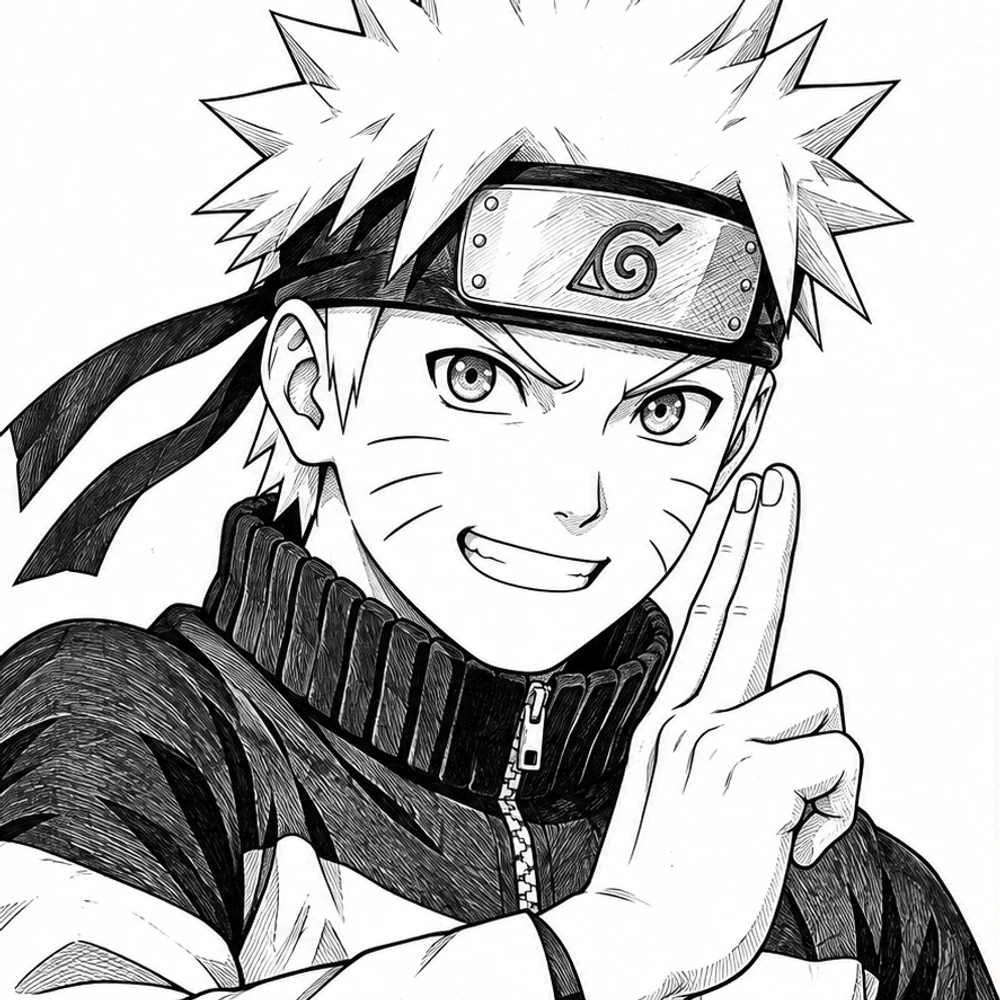
BEFORE · BLACK & WHITEBlack-and-white drawing of Naruto Uzumaki before coloring
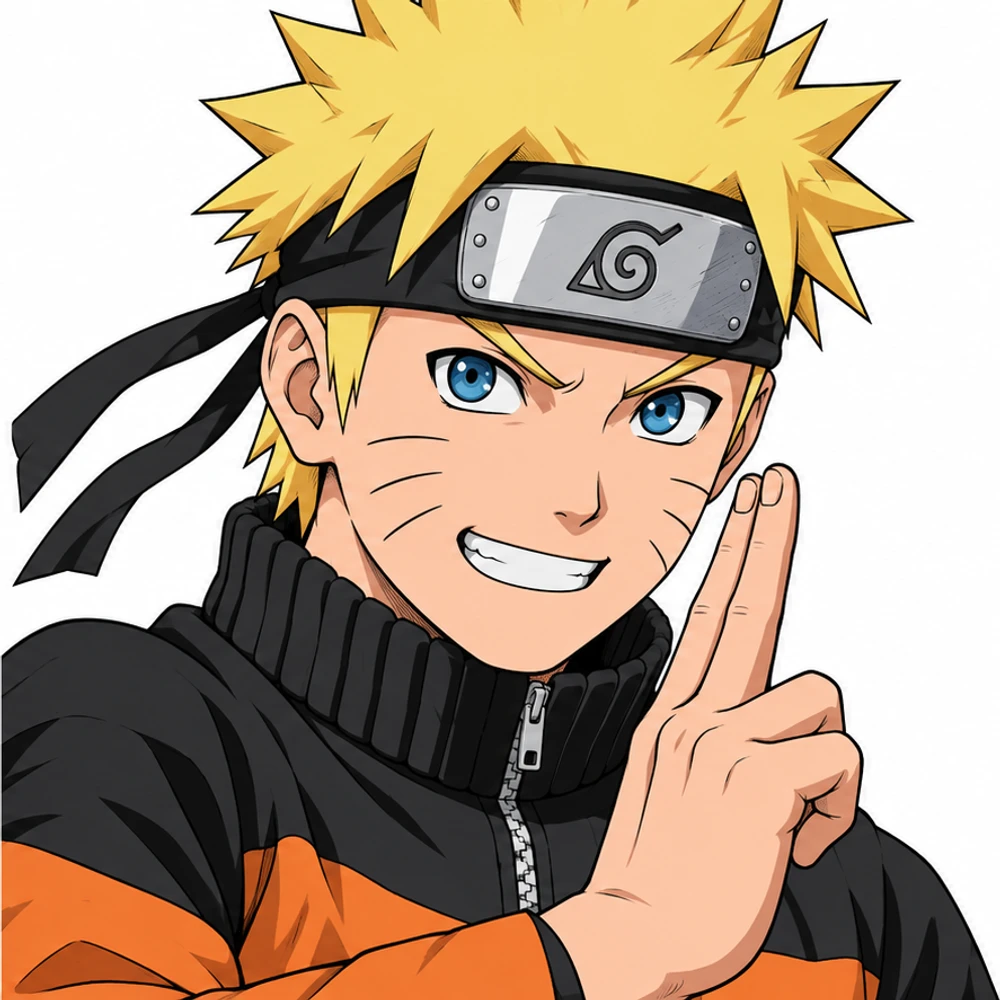
AFTER · COLOR STUDYNaruto Uzumaki after AI-assisted coloring, same drawing and composition
NARUTO UZUMAKI · BEFORE & AFTERBlack-and-white character artwork and AI-assisted color illustration.
YOUR IMAGE, YOUR EXPLORATION

Color your Naruto manga panel online

Preview your image, then run DDColor to explore an automatic color interpretation. AI processing requires an account and credits; each image uses one credit. View plans.

YOUR ORIGINAL · START HERE

Color a Black-and-White Manga Page Online

Sign in to use your coloring credits. Upload one manga panel or page, run DDColor AI, and compare the result. PNG, JPG, or WebP · up to 10 MB.

Your image is sent to Replicate for AI colorization. DDColor is designed mainly for photos, so manga line art may vary. Download your result before it expires.

THE COLOR GUIDE

A practical guide to Naruto manga color online

Naruto panels can combine expressive faces, detailed ninja outfits, motion lines, and textured backgrounds in a small space. Color can help separate these elements, but it can also change their emphasis. Begin with a single panel and inspect the character silhouette, facial details, and dialogue. For a full page, check the reading path across panels before refining the palette in an image editor.

DDColor was developed mainly for photo colorization. It does not provide prompts, a custom palette, or guaranteed preservation of lines and text. Treat each result as a starting point and compare it carefully with your source.

Illustrative Naruto Uzumaki color study showing character and background contrast
Naruto Uzumaki: AI-assisted color illustration.
01

Character portraits and team scenes

Try a close-up of Naruto, Sasuke, Sakura, or your own ninja fan art to evaluate facial shading and costume separation. In group panels, check each face and outfit individually; automatic color choices can vary even within one image.

02

Jutsu effects and fast-moving battles

Inspect energy effects, smoke, speed lines, and overlapping figures after processing. The AI estimates colors without understanding a technique’s intended appearance, so treat the result as an interpretation and adjust effect colors yourself.

03

Village streets and forest settings

Explore how color separates figures from buildings, foliage, and distant scenery. Review dense textures and shaded areas so background colors do not overwhelm the main action or reduce dialogue contrast.

THREE SIMPLE STEPS

How to color Naruto manga online

Work directly in your browser, from a source image to a downloadable color study.

01

Upload your artwork

Choose one PNG, JPG, or WebP image up to 10 MB. The editor shows a local preview before you start AI processing.

02

Run AI colorization

Sign in with available credits and select Colorize with AI. The model estimates a palette automatically from your image.

03

Compare and download

Inspect the original and colored output side by side. Download the result and make any finishing changes in your preferred image editor.

MAKE A STRONGER START

Prepare your image for AI coloring

A thoughtful source image makes the result easier to evaluate and refine.

01

Keep faces and headbands clear

Use a sharp source with visible eyes, facial marks, and small costume details. Avoid compressed screenshots that blur fine lines before colorization starts.

02

Preserve the whole action beat

Crop around a complete panel rather than cutting through a figure or effect. Include nearby speech balloons when they are part of the scene you want to evaluate.

03

Check outfit and effect colors

The tool does not recognize official character palettes or let you choose a jutsu color. Compare the output with your intended design and make specific adjustments after download.

04

Inspect shadows, lettering, and textures

Zoom in on solid black areas, screentones, and dialogue. Keep the original so you can restore fine detail or clean white speech balloons in your editor.

05

Match separate panels manually

Uploads are processed independently. If you color a sequence, review recurring characters and backgrounds together and harmonize the palette before using the finished images.

ROOM TO EXPERIMENT

Explore Naruto scenes through color

For Naruto manga fans

Study how a new palette changes the mood of an expression, a team moment, or an action beat using a source image you are allowed to process.

For ninja fan-art creators

Use your original line drawing as a starting point for an automatic color study. Refine hair, costumes, and lighting by hand to suit your design.

For comic art practice

Compare the original values and colored output to study focal points, figure separation, and contrast in a busy composition.

CHOOSE YOUR STARTING POINT

Naruto colored manga: AI studies and published editions

If your goal is to read a colored chapter, look for an authorized edition through its publisher or licensed retailer. If your goal is to explore the colors of an image you can use, start with the colorizer above.

An AI color study

You supply one image, and the model estimates a palette. The result is an experimental interpretation that may need corrections to character colors, lettering, and fine lines.

A published colored edition

A published edition is a separate reading product. This tool does not supply its pages, reproduce its palette, or replace access to an authorized source.

GOOD TO KNOW

Naruto Manga Color Online FAQ

Practical answers before you upload your artwork.

How do I try Naruto manga color online?

Upload one black-and-white Naruto panel, page, or original fan-art image you have permission to use. Sign in with available credits, select Colorize with AI, compare the output, and download your color study.

Can I color a full Naruto manga page?

Yes. Upload a PNG, JPG, or WebP image up to 10 MB. A complete page is processed as one image; inspect small faces, lettering, and color differences between panels afterward.

Does the AI use official Naruto character colors?

No. DDColor estimates a palette from the image rather than using an official Naruto character database. Hair, clothing, eyes, and effects may differ from the colors you expect.

Can I choose a color for a character or jutsu?

The current tool does not provide prompts, palette controls, character references, or region selection. Download the output and make targeted color adjustments in your preferred editor.

Is this a Naruto colored manga reader?

No. This page lets you color an image you supply. It does not host manga chapters, provide a chapter reader, or distribute a published colored edition.

Can I color several Naruto chapters at once?

No. The workflow accepts one image at a time, with no chapter archive upload or batch processing. Upload individual permitted pages or panels separately.

Is Naruto manga colorization free?

Previewing your uploaded image is available before processing. AI colorization requires an account and available credits; each processed image uses one credit. Visit the pricing page for current plans.

Will the original lines and text stay exactly the same?

Exact preservation is not guaranteed. DDColor was developed mainly for photo colorization. Check contours, facial details, screentones, and lettering against the original and make corrections where needed.

Can I publish a colored Naruto panel?

Colorization does not grant rights to the source artwork. Only publish or distribute images you own or have permission to use, and follow the permissions attached to your source.

Are the reference images Naruto artwork?

The comparison shows AI-created Naruto Uzumaki character illustrations in black-and-white and color.

KEEP EXPLORING

Find a color guide for your artwork

START WITH ONE IMAGE

Ready to explore a new palette?

Bring your black-and-white artwork and see what color can add to the scene.

Try Naruto Manga Color Online